
The developers of the Kagi search engine presented the alpha release of the Orion web browser for the Linux platform. Orion builds for Linux formed in flatpak format. Previously, the browser was released only for the macOS and iOS platforms. The Orion browser is built on the WebKit engine and notable for blocking advertising and code for tracking movements by default, absence of collection and sending telemetry, integration with search services Kagi and the ability to install add-ons from Safari, Chrome and Firefox.
Orion offers additional options for customizing the interface and pages viewed, not limited to changing themes. For example, you can add your own buttons to the panel to call JavaScript code or perform functions available in the browser. You can change fonts, disable non-scrolling headers, force dark skins on sites, and selectively disable JavaScript, Cookies, and external fonts. There is a mode for quickly removing HTML elements from pages by selecting them with the cursor, as well as a page editing function that allows you to change the content before taking a screenshot or saving to disk.
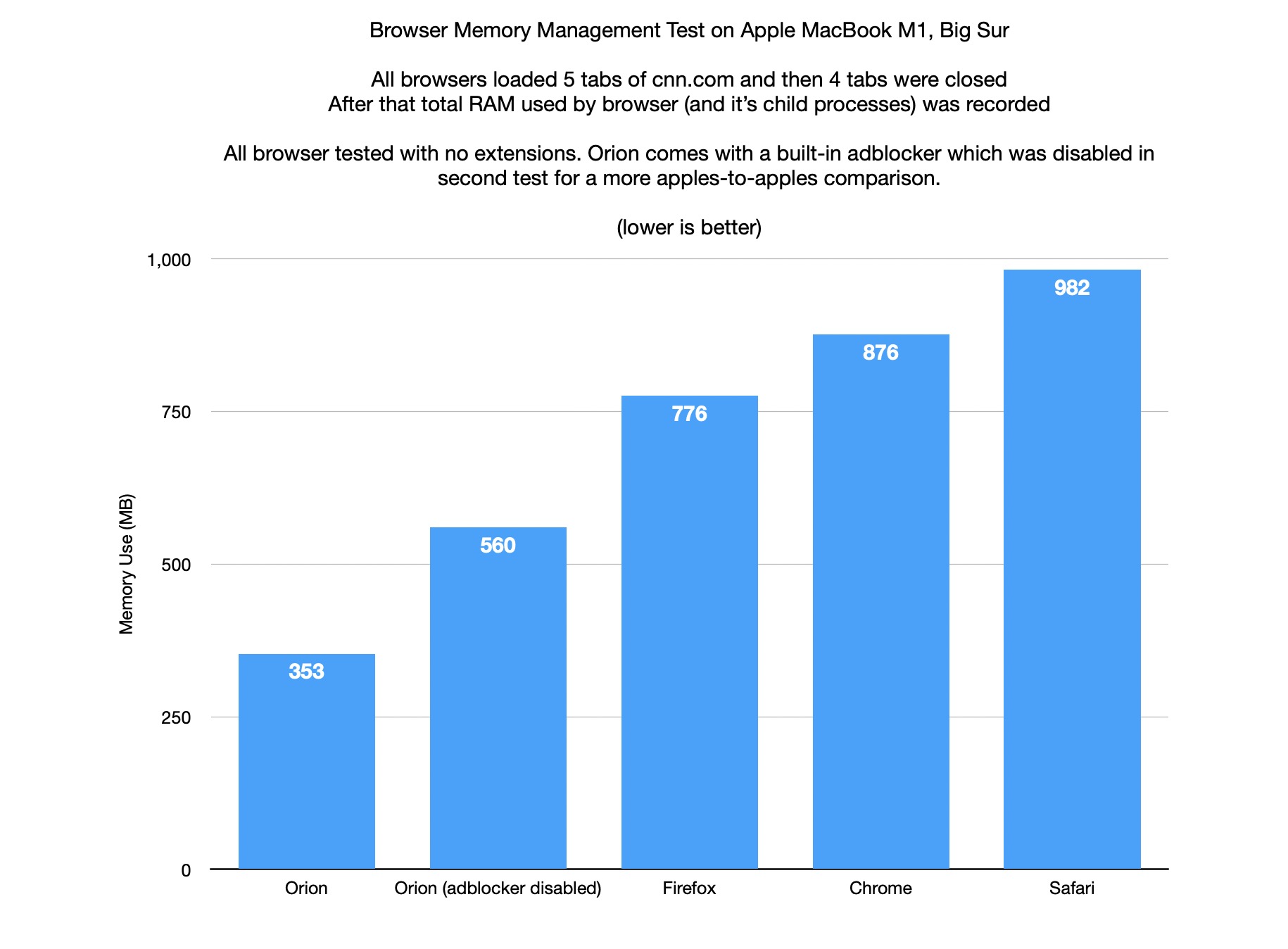
Declared more efficient memory release – in the test, after closing tabs, the browser took up 3 times less memory compared to Safari, 2.5 times compared to Chrome and 2 times compared to Firefox. At the same time, those who tested the Linux version of Orion noted a higher CPU load compared to Firefox.
Other features of Orion include vertical tabs, quick search mode, integration with archive.org for viewing older versions of pages, compact display mode tabs, auto-hide panels, change User Agent, preview links, group tabs, save energy mode, block autoplay of audio and video, disable blocking of copying to the clipboard used on some sites.
The alpha version for Linux includes all the basic features, including local export/import, password manager, management of horizontal and vertical tabs (except for the Tab Switcher interface), session saving, auto-recovery of the state after restart, bookmarks, grouping of saved pages into folders, navigation history management. WebKit extensions are not yet supported and there is no infrastructure for synchronization between different user systems.